
How to reply to a DRC-01 Show Cause Notice
A structured method for drafting a DRC-01 reply that stands on the client's own GSTN record, not on guesswork.
- DRC-01
- show cause
- GSTR-1
- GSTR-3B
- CGST Act
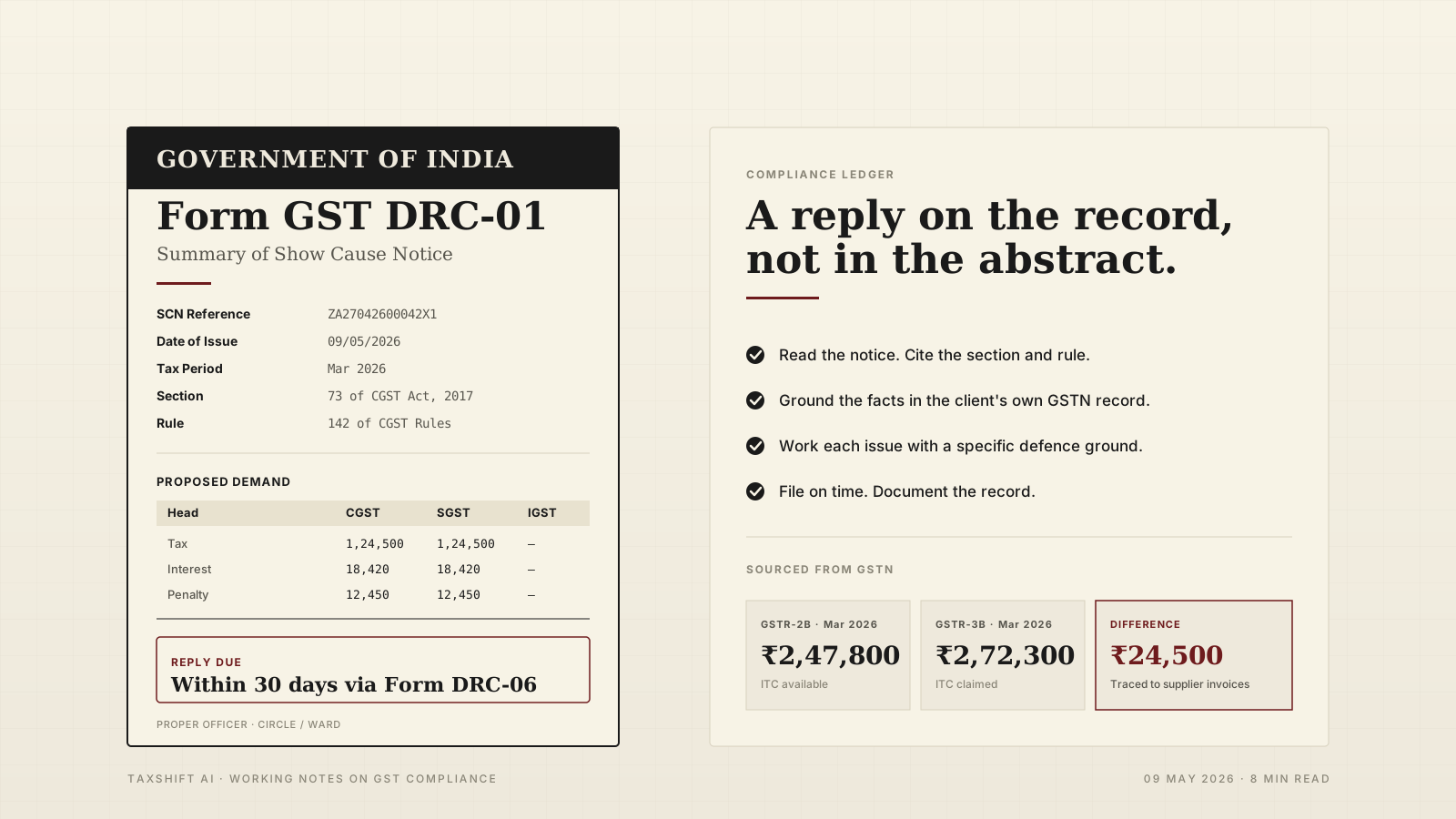
A DRC-01 is the formal show cause notice issued under the CGST Act when the department proposes a demand of tax, interest, or penalty. It lands in the client's GSTN portal, not in their inbox, and the clock starts the day it is uploaded. Most DRC-01s cite a specific return period, a specific mismatch, and a specific computation. Most DRC-01 replies either fail to cite the client's own GSTN record, or fail to work through each proposed demand on its own terms.
This piece is a practical method: read the notice, ground the facts in the client's data, work each issue with a specific defence ground, and draft a reply that a proper officer can actually act on.
1. What DRC-01 is under the law
Under Section 73 of the CGST Act, 2017, a proper officer issues DRC-01 when they propose a demand of tax not paid, short paid, or erroneously refunded, for any reason other than fraud or wilful misstatement. Under Section 74, the same proper officer issues DRC-01 when fraud, wilful misstatement, or suppression of facts is alleged, with the higher penalty regime attached.
Procedurally, DRC-01 is issued under Rule 142 of the CGST Rules, 2017. Rule 142 prescribes the format of the summary of the show cause notice, the delivery on the common portal, and the link between DRC-01 and the underlying adjudication.
Your reply is typically filed in Form DRC-06 against the reference of the DRC-01. The time to reply is stated in the notice itself and in the portal. Miss the window, and the next step is usually the summary of the order in DRC-07.
2. Read the notice before you pick up a pen
A DRC-01 almost always contains four things that a reply must honour:
- The section and rule cited (Section 73, Section 74, Rule 142).
- The tax period in question.
- A table of proposed demand: taxable value, IGST, CGST, SGST, cess, interest, and penalty, broken by head.
- An explanation of why the officer believes the demand is owed.
Start by opening the DRC-01 PDF and the underlying computation sheet if one is attached. TaxShift AI shows the notice PDF, its version history, and the case timeline on the Notice Detail page, so you can see whether the DRC-01 is standalone or the follow-up to an ASMT-10 under Section 61 that was not replied on time.
If a DRC-01 follows an ASMT-10 and the ASMT-10 was not replied inside thirty days, the adjudication path narrows. Flag that to the client at the start of the engagement, not at the end.
3. Ground the facts in the client's data
The single most common weakness in a DRC-01 reply is a reply that argues in the abstract. A proper officer adjudicates on documents. You need a clean fact base drawn from the client's own GSTN record before you pick a line of defence.
For a typical DRC-01 issued on the basis of GSTR-1 versus GSTR-3B mismatch or on input tax credit concerns, pull the following for the tax period and the adjacent periods:
- GSTR-3B summary for the tax period. The
retsumresponse has the supply tables (sup_details), the ITC net (itc_net), and the filing status. - GSTR-1 summary and detail for the tax period. Section-wise detail (B2B, B2CL, B2CS, CDNR, CDNUR, EXP, amendments, HSN summary) is fetched per section from GSTN.
- GSTR-2B for the tax period. Compare claimed ITC against the 2B locked figure.
- Autoliab and syscalcintrst for the tax period. These are GSTN's own auto-calculated comparison numbers; using them removes arguments about your computation.
- Cash, ITC, and tax ledgers at the close of the tax period. These establish what was actually paid and what was available.
- Case timeline and related notices for the same case ID, including any prior ASMT-10, DRC-01A, or amendment order.
TaxShift AI exposes each of these as a report you can download as an Excel workbook. The Return Comparison workbook produces four sheets per financial year — GSTR-1 vs GSTR-3B, GSTR-2B vs GSTR-3B, GSTR-2A vs GSTR-3B, and a combined view — with values taken directly from GSTN autoliab and retsum responses. There is no manual arithmetic; differences are blank where one side is missing, so you do not inherit a spurious demand from your own computation.
For figures that matter to the reply, quote the GSTN-sourced number verbatim and cite the return or ledger it came from. That alone disarms a fair number of DRC-01s.
4. Work the issues one at a time
A DRC-01 usually bundles more than one issue. Resist the temptation to write a single sweeping paragraph that answers the whole notice in one breath. Draft the reply issue by issue.
For each issue:
- State the department's case in one sentence. "The show cause notice proposes a demand of ₹X,XX,XXX on the basis that ITC claimed in GSTR-3B for the month of March 2026 exceeds ITC available in GSTR-2B for the same month."
- State the client's position in one sentence. "The ITC claimed in GSTR-3B for March 2026 is supported by the client's GSTR-2B for the same month plus supplier invoices reported in the succeeding tax period, claimable under the extended timeline prescribed by Section 16(4) of the CGST Act."
- Cite the supporting record. Quote the 2B figure from GSTN, the 3B figure from GSTN, and attach the supplier invoices you rely on.
- Cite the section and rule you rely on. Section 16 for ITC eligibility, Rule 36 for ITC conditions, Section 34 for credit notes, and so on.
- Address the proposed penalty and interest. If the demand itself falls, the penalty and interest follow. If the demand stands in part, the penalty and interest need a separate calculation.
TaxShift AI's Notice Reply Assistant walks through this structure for each issue. It pulls the reconciliation, the GSTR-3B summary, the ledger, the case timeline, and the related notices from the same client, surfaces the relevant defence grounds, and lets the CA select the grounds that apply. Every figure in the draft is traced back to the GSTN call that produced it. The CA stays in charge of which grounds apply; the tool does the legwork.
5. The structure of a good reply
A DRC-01 reply that a proper officer can act on typically has this shape.
- Letterhead — your firm, your address, your GSTIN, contact details.
- Title — "Reply to Show Cause Notice in Form GST DRC-01".
- Reference table — SCN reference number, date of issue, case ID, tax period, section cited, rule cited, date of reply.
- Addressee — The Proper Officer, the office, the circle or ward.
- Subject — brief, one line, quoting the section, the tax period, and the proposed demand.
- Body — a preliminary paragraph acknowledging the notice, followed by issue-by-issue paragraphs as described in the previous section.
- Prayer — a concise ask: drop the demand, reduce the demand, or adjudicate on the record. State the specific relief sought, not a general plea.
- Closing — authorised signatory, designation, PAN, GSTIN, date, place.
- Enclosures — numbered list of every document relied upon.
Indian formatting conventions: amounts in Indian digit grouping (₹1,49,999), dates in DD/MM/YYYY or "01 March 2026", tabular numerals for any column of figures.
6. File on time, and then document
DRC-06 is filed on the common portal against the DRC-01 reference. Keep the filed PDF and the portal acknowledgement; both are part of the case record.
A reply that lands on the record on day twenty-nine of a thirty-day window is still a reply on the record. A reply that lands on day thirty-one, even if it is the more thorough reply, has to fight procedural ground before it can be heard. Use a ledger like TaxShift AI's Notice Monitoring to see the due-date countdown across the whole book, not just the one client whose reply you are working on today.
7. What this does not replace
This piece is a method, not legal advice. A DRC-01 reply turns on the specific facts of a specific client and on the specific notice in front of you. A figure that is exonerating for one client can be incriminating for another. Use the method; use the data; use your judgement.
Summary
A DRC-01 reply stands or falls on the client's own GSTN record. Read the notice carefully, ground the facts in the right returns and ledgers, work each issue with a specific defence ground, cite the section and rule you rely on, and file on time. The work is mostly plumbing; TaxShift AI does the plumbing so you can focus on the judgement calls.